The AI & Automation Hub For UK Businesses
AI is reshaping every industry.
The challenge isn’t knowing it matters. It’s knowing where to start, how to deploy it safely, and how to turn
it into real business value.
The AI hub is designed to help you explore how organisations are using AI today – from Copilot productivity gains to
intelligent automation, AI agents and digital workforces – all deployed securely within the Microsoft ecosystem.
All Your Questions About AI - Answered
Whether you’re just starting to explore AI or already experimenting with tools like Copilot or ChatGPT, most organisations are asking
the same questions.
This hub helps you understand the opportunities, see real-world examples, and discover the safest way to deploy AI in your
organisation.
How can AI actually help my business?
new growth opportunities.
How are companies in my sector using AI?
how they work.
What kind of results can AI deliver?
Where do we even start with AI?
How do we know AI is safe to use in our business?
The AI Adoption Roadmap - Where to begin?
1
AI Assistants
2
Automated Workflows & AI Apps
3
AI Agents (Autonomy & Action)
4
Agentic Workflows (Process Automation)
5
Multi-Agent System (Digital Teams)
6
Digital Workforce (Operational Scale)
7
AI-Driven Business (Strategic Transformation)
Most Requested AI Solutions
AI Knowledge Agents
AI Service Desk Agents
AI Customer Support
AI Document Processing
AI Voice Agents
• 40–60% reduction in call centre workload
AI Sales Research
AI Lead Qualification
AI HR Support
AI Finance Automation
AI Operations Insight
• Improved resource utilisation
• Better data-driven decision making
AI Marketing Campaign
AI Workflow Orchestration
Explore AI Opportunities
AI Use Cases Per Industry
AI opportunities often vary depending on the industry you operate in.
CLICK on the industry that best reflects your organisation to reveal real world use cases already delivering a ROI
-
Shift Handovers
Operational details lost between shifts.
-
Engineering Search Time
Engineers spend time searching manuals and maintenance documentation.
-
Quality & CAPA Reporting
Quality investigations and compliance documentation are time-consuming.
-
Production Visibility
Production data is often manual, delayed or inconsistent.
-
Supplier Quote Analysis
Procurement teams manually compare supplier quotes.
-
Equipment Downtime
Maintenance issues are often identified after failure.
-
Knowledge Loss
Critical engineering knowledge sits with a few experienced staff.
Manufacturing:
Embedded inside everyday tools like Teams, Outlook and Excel.
- Shift handover summaries
- Production meeting summaries
- Quality report drafting
- Supplier quote comparisons
Removes repetitive operational processes.
- Automated production reporting
- Automated CAPA documentation
- Supplier document processing
- Maintenance scheduling workflows
AI agents interact with systems and support operational decisions.
- Engineering knowledge agent (manuals + troubleshooting)
- Predictive maintenance insights agent
- Production optimisation agent
- Operational reporting agent
Rolls-Royce Intelligent Factory Programme
Using AI and advanced analytics to optimise production.
Results include:
- 30% improvement in machine utilisation
- Predictive maintenance reducing downtime
- Optimised scheduling across production lines
AI helps manufacturers unlock more value from their existing equipment and engineering expertise.
[Source]
-
Clinical Documentation
Doctors and clinicians spend hours completing patient notes and reports.
-
Patient Information Access
Finding the right patient information across multiple systems takes time.
-
Appointment Administration
Scheduling, cancellations and patient coordination create significant workload.
-
Patient Triage & Demand
Healthcare teams must prioritise patients quickly and accurately.
-
Medical Research & Guidance
Clinicians spend time searching clinical guidelines and evidence.
-
Operational Capacity
Hospitals struggle with patient flow, bed availability and discharge delays.
Healthcare:
Productivity inside Outlook, Teams, Word and clinical systems.
- Clinical note summaries – faster documentation
- Medical research summaries – quicker insights
- Patient communication drafts – faster responses
Removes repetitive healthcare administration tasks
- Appointment scheduling automation – improved patient access
- Clinical coding automation – faster documentation processing
- Operational reporting automation – quicker service insights
AI agents retrieve clinical information and support healthcare teams.
- Clinical knowledge agent – instant access to guidelines and protocols
- Patient information agent – summarise patient records quickly
- Diagnostic support agent – assist clinicians in analysing medical images
NHS – AI-Assisted Cancer Detection from Medical Imaging
The NHS is deploying artificial intelligence tools to support radiologists in analysing medical scans such as mammograms, CT scans and chest X-rays.
AI systems analyse imaging data to highlight potential abnormalities and assist clinicians in identifying cancers earlier.
These systems act as a “second reader” during screening, helping radiologists review images more efficiently while maintaining diagnostic accuracy.
Reported Impact
- AI tools can help identify cancers that may be missed by human readers
- AI has been shown to increase cancer detection rates in screening programmes
- AI can help reduce radiologist workload by assisting with image analysis
UK Government announcement on NHS AI breast cancer trial
[Source]
-
Inventory Visibility
Stock levels and demand forecasting are often inconsistent.
-
Customer Enquiries
Customer service teams handle large volumes of repetitive questions.
-
Sales & Demand Forecasting
Predicting product demand and seasonal trends is difficult.
-
Product Information Management
Teams spend time updating product descriptions and listings.
-
Marketing Campaigns
Retail marketing teams must constantly create promotions and content.
-
Pricing & Competition
Retailers must constantly monitor competitor pricing and margins.
Retail:
Productivity inside tools like Outlook, Teams, Excel and marketing platforms.
- Sales report summaries – faster insights
- Marketing campaign drafts – quicker promotion creation
- Customer communication – faster responses
Removes repetitive retail operations and reporting tasks.
- Inventory reporting automation – improved stock visibility
- Product listing automation – faster catalogue updates
- Demand forecasting automation – better planning insights
AI agents support customer engagement and retail operations.
- Customer service agent – answer product and order questions
- Inventory insights agent – identify stock risks and trends
- Pricing optimisation agent – monitor market pricing and demand
Walmart – AI Supply Chain Optimisation
Walmart uses AI and machine learning to forecast demand, optimise inventory levels and improve logistics operations across thousands of stores.
AI models analyse purchasing patterns, weather data and regional demand to ensure products are stocked in the right locations.
Results
- Improved demand forecasting accuracy
- Reduced stockouts and excess inventory
- Faster replenishment and supply chain decisions
[Sources]
-
Site Reporting
Daily site reports and project updates take time to compile.
-
Project Documentation
Drawings, specifications and RFIs are spread across systems.
-
Safety Compliance
Monitoring safety procedures and inspections requires manual reporting.
-
Project Scheduling
Coordinating contractors, materials and timelines is complex.
-
Cost Forecasting
Construction projects frequently exceed planned budgets.
-
Project Communication
Important updates can be missed across contractors and teams.
Construction:
Productivity inside tools like Outlook, Teams, Word and Excel.
- Site report summaries – faster daily reporting
- Project meeting summaries – clearer actions and updates
- Tender document drafting – quicker preparation
Removes repetitive construction reporting and documentation tasks.
- Site reporting automation – faster progress updates
- Safety documentation processing – improved compliance tracking
- Procurement comparison automation – quicker supplier decisions
AI agents analyse project information and support construction teams.
- Project documentation agent – instant access to drawings and specifications
- Safety monitoring agent – identify potential site risks
- Project scheduling agent – detect delays and optimise timelines
Skanska – AI Construction Site Analytics
Skanska uses AI and machine learning to analyse construction site photos and videos, helping identify safety risks and improve project monitoring.
Results
- Faster identification of job-site safety risks
- Reduced manual review of construction site images
- Improved compliance monitoring
[Source]
-
Client Research
Consultants spend time researching industries, companies and markets.
-
Proposal Creation
Drafting proposals and client presentations requires significant effort.
-
Report Writing
Preparing reports and analysis documents requires manual work.
-
Knowledge Access
Previous project knowledge and frameworks are often difficult to find quickly.
-
Meeting Documentation
Meeting notes and action summaries must be written manually.
-
Client Preparation
Consultants spend time compiling client briefings before meetings.
Professional Services:
Productivity inside Outlook, Teams, Word and PowerPoint.
- Proposal drafting – faster client proposals
- Meeting summaries – automatic notes and actions
- Research summaries – quicker industry insights
Removes repetitive documentation and reporting processes.
- Proposal generation workflows – consistent proposal documents
- Client reporting automation – faster performance reports
- Document processing automation – reduced admin workload
AI agents retrieve knowledge and support consulting teams.
- Internal knowledge agent – access past project insights and frameworks
- Research agent – summarise industry and market data
- Client insights agent – compile company information before meetings
Deloitte – AI Knowledge Assistant
Deloitte developed an internal generative-AI assistant called PairD to help employees search internal knowledge, summarise research and support project delivery.
The AI system allows consultants to quickly access Deloitte’s internal expertise, methodologies and research across the organisation.
Results
- Faster access to internal knowledge and research
- Improved productivity when preparing documents and presentations
- AI assistant deployed across tens of thousands of employees
[Sources]
-
Route Planning
Optimising delivery routes manually can be time consuming.
-
Delivery Reporting
Operational delivery reports often require manual compilation.
-
Warehouse Coordination
Inventory updates and warehouse reporting can be inconsistent.
-
Customer Delivery Updates
Customer service teams handle frequent delivery status queries.
-
Demand Forecasting
Predicting shipment volumes and delivery demand is difficult.
-
Operational Visibility
Managers often lack real-time insights across logistics operations.
Logistics:
Productivity inside Outlook, Teams and operational reporting tools.
- Delivery report summaries – faster operational updates
- Route planning insights – improved planning decisions
- Customer communication drafts – faster responses
Removes repetitive logistics reporting and coordination tasks.
- Delivery reporting automation – faster operational insights
- Warehouse reporting automation – improved stock visibility
- Shipment documentation processing – reduced administrative workload
AI agents analyse logistics data and support operational teams.
- Route optimisation agent – identify more efficient delivery routes
- Warehouse insights agent – highlight inventory risks and demand trends
- Delivery tracking agent – provide real-time shipment insights
DHL – AI Logistics Optimisation
DHL uses AI and predictive analytics to analyse logistics data and optimise delivery operations across its global network.
AI models evaluate traffic conditions, shipment volumes, weather data and historical delivery patterns to plan more efficient routes and forecast delivery times.
Results
- More efficient route planning and delivery scheduling
- Reduced fuel consumption and operating costs
- Improved delivery time accuracy for customers
[Sources]
-
Developer Documentation
Developers spend time searching documentation and internal knowledge.
-
Support Ticket Volume
Support teams handle large volumes of repetitive customer queries.
-
Software Testing
Manual testing processes slow down release cycles.
-
Technical Reporting
Engineering and operational reports require manual preparation.
-
Knowledge Sharing
Important technical knowledge is often spread across systems.
-
Product Feedback Analysis
Analysing user feedback and support tickets is time consuming.
Technology:
Productivity inside tools like Teams, Outlook and development environments.
- AI-assisted coding – faster software development
- Documentation drafting – quicker technical writing
- Meeting summaries – clearer engineering updates
Removes repetitive operational and support processes.
- Support ticket classification – faster issue routing
- Automated testing workflows – improved software quality
- Product feedback analysis – automated insights
AI agents support developers, support teams and operations.
- Developer knowledge agent – instant access to technical documentation
- Support assistant agent – respond to common customer queries
- System monitoring agent – detect anomalies in system performance
GitHub Copilot – AI Assisted Development
GitHub Copilot is an AI coding assistant that suggests code snippets and functions while developers write software.
It integrates directly into development environments such as Visual Studio Code and helps developers automate repetitive coding tasks and generate solutions more quickly.
Results
- Developers completed programming tasks 55% faster in controlled productivity studies
- Reduced time spent writing repetitive code
- Faster development cycles and quicker feature delivery
[Sources]
-
Technical Documentation
Engineers spend time preparing reports, specifications and documentation.
-
Design Data Analysis
Large volumes of engineering data and simulations require detailed review.
-
Project Coordination
Important updates can be missed across engineering teams and contractors.
-
Standards & Compliance
Engineers must review industry standards and regulatory requirements.
-
Knowledge Access
Previous project documentation and insights can be difficult to locate.
-
Design Validation
Reviewing complex designs and identifying potential risks takes time.
Engineering:
Productivity inside tools like Outlook, Teams, Word and Excel.
- Technical report drafting – faster documentation
- Project meeting summaries – clearer actions and updates
- Design review summaries – quicker insights
Removes repetitive engineering reporting and documentation tasks.
- Project reporting automation – faster progress updates
- Technical document processing – reduced manual work
- Compliance documentation automation – improved consistency
AI agents analyse engineering data and support design decisions.
- Engineering knowledge agent – instant access to standards and documentation
- Design optimisation agent – identify design improvements and risks
- Engineering analysis agent – evaluate performance and simulation data
Siemens – AI Digital Twin Engineering
Siemens uses AI-enabled digital twin technology to create virtual models of products, machines and production systems.
These digital models allow engineers to simulate real-world conditions, test design changes and optimise performance before physical production begins.
Results
- Reduced need for physical prototypes
- Faster engineering validation and testing
- Earlier identification of design and performance issues
[Sources]
-
Lesson & Content Creation
Teachers spend significant time preparing lesson plans and learning materials.
-
Student Support Queries
Staff handle large volumes of repetitive student questions.
-
Research & Knowledge Access
Students and lecturers spend time reviewing large volumes of research material.
-
Administrative Work
Course documentation, reporting and paperwork require manual effort.
-
Assignment Feedback
Providing structured feedback for students takes considerable time.
-
Student Engagement
Identifying students who may need additional support can be difficult.
Education:
Productivity within tools like Word, Teams, Outlook and learning platforms.
- Lesson plan drafting – faster course preparation
- Research summaries – quicker academic insights
- Student communication drafts – faster responses
Removes repetitive education administration tasks.
- Course documentation automation – faster updates
- Student enquiry workflows – improved response handling
- Academic reporting automation – faster performance insights
AI agents support staff and students with instant access to information.
- Student support agent – answer common course questions
- Academic knowledge agent – retrieve research and learning materials
- Student success agent – identify students needing additional support
The Open University – Predictive Learning Analytics
The Open University developed a predictive analytics system called OU Analyse to identify students who may be at risk of failing or dropping out of a course.
The system analyses engagement data from the university’s virtual learning platform, including assignment submissions and student activity patterns.
Impact
- earlier identification of at-risk students
- faster tutor intervention and student support
- improved student retention and course completion
[Sources]
-
Property Listing Creation
Agents spend time writing listings and marketing materials.
-
High Volume Enquiries
Property teams handle large numbers of repetitive buyer and tenant questions.
-
Document Processing
Contracts, compliance documents and property reports require manual review.
-
Property Research
Agents spend time gathering property and market information.
-
Tenant & Buyer Communication
Responding to enquiries, viewings and updates takes significant time.
-
Property Valuation
Accurately pricing properties requires analysing multiple market factors.
Real Estate & Property:
Productivity inside tools like Outlook, Teams, Word and CRM systems.
- Property listing drafting – faster listing creation
- Client email drafting – faster communication
- Market research summaries – quicker insights
Automation reduces manual operational processes.
- Viewing scheduling workflows – automated booking coordination
- Property documentation generation – automated report creation
- Tenant enquiry workflows – improved response handling
AI agents interact with property data and client enquiries.
- Property enquiry agent – answer buyer and tenant questions
- Property knowledge agent – retrieve listing and market information
- Tenant support agent – handle maintenance or tenancy requests
Zillow – AI Property Valuation Platform
Zillow uses machine learning and artificial intelligence to estimate home values through its automated valuation model called Zestimate.
The system analyses large datasets including public property records, recent home sales and housing market trends to generate real-time property value estimates.
Results
- AI models estimate values for over 100 million homes
- Faster property pricing insights for buyers and sellers
- Improved property recommendations and search experiences
[Sources]
-
Fundraising Administration
Manual donor communications and campaign management.
-
Grant Applications
Significant time spent researching and preparing grant applications.
-
Volunteer Coordination
Volunteer schedules, availability and communication are often manual.
-
Impact Reporting
Reporting outcomes to donors and funders can be time-consuming.
-
Donor Data Management
Donor data is often fragmented across systems.
-
Limited Operational Capacity
Small teams handling large volumes of administrative work.
-
Knowledge & Documentation
Policies, safeguarding guidance and procedures can be difficult to locate quickly.
Charities & Non-Profits:
Embedded inside everyday tools like Teams, Outlook and Word.
- Grant application drafting
- Donor communication summaries
- Campaign content creation
- Meeting and stakeholder briefing notes
Removes repetitive operational processes.
- Automated donor reporting
- Volunteer onboarding workflows
- Grant application tracking
- Donation data consolidation
UNICEF – AI-Driven Fundraising Analytics
UNICEF uses artificial intelligence and predictive analytics to analyse donor behaviour and improve the targeting of fundraising campaigns.
Machine-learning models analyse supporter engagement and donation history to identify potential donors and personalise communication.
Results
- improved donor targeting for fundraising campaigns
- more personalised supporter communications
- increased effectiveness of fundraising outreach
[Sources]
-
Manual Data Entry
Processing invoices, receipts and financial records.
-
Client Email Volume
Accountants handling large volumes of repetitive client questions.
-
Tax Documentation
Preparing tax submissions and compliance documents.
-
Financial Analysis
Manual analysis of financial reports and transactions.
-
Compliance Reporting
Producing reports for regulators and auditors.
-
Client Onboarding
Collecting documentation and verifying financial data.
Accounting & Financial Advisory:
Embedded in Outlook, Excel and Teams.
- Financial report summaries
- Tax document drafting
- Client email responses
- Financial data analysis
Removes repetitive accounting processes.
- Invoice data extraction
- Bank reconciliation automation
- Client onboarding workflows
- Financial reporting automation
Xero – AI-Powered Bookkeeping Automation
Cloud accounting platform Xero uses machine learning and AI to automate common bookkeeping tasks such as bank reconciliation, transaction categorisation and financial data processing.
The platform analyses historical transactions and learns patterns from previous reconciliations to suggest how new transactions should be categorised and matched to invoices or expenses.
These machine-learning models reduce the need for manual data entry and help accountants process financial records more efficiently.
Impact
- faster reconciliation of bank transactions
- reduced manual data entry in bookkeeping workflows
- improved accuracy in transaction categorisation
AI-powered automation allows accountants to spend less time on routine processing and more time providing financial insight and advisory services.
[Source]
-
Claims Processing
Manual review of claims documents.
-
Customer Enquiries
Large volumes of repetitive customer questions.
-
Policy Document Management
Complex policy wording difficult to interpret quickly.
-
Fraud Detection
Identifying suspicious claims manually.
-
Underwriting Analysis
Time-consuming risk analysis and data review.
-
Regulatory Compliance
Maintaining compliance documentation and reporting.
Insurance:
Productivity inside tools like Outlook, Teams and document systems.
- Policy document summaries
- Customer communication drafting
- Claims documentation review
- Risk report generation
Removes repetitive insurance processes.
- Claims document processing
- Policy renewal workflows
- Customer onboarding automation
- Compliance reporting automation
Allianz – AI-Driven Claims Processing
Global insurer Allianz uses artificial intelligence and machine-learning systems to automate parts of the claims process and improve fraud detection.
AI tools analyse claims data and documentation, helping insurers validate claims faster and identify suspicious activity patterns.
For example, Allianz has introduced AI systems that automate parts of claims handling and assist teams in processing claims more efficiently.
Some systems also analyse claim documents and supporting data automatically to speed up validation and settlement decisions.
Impact
- faster claims processing and settlement
- reduced manual handling of routine claims
- improved fraud detection through data analysis
In some deployments, automated claims systems have processed most claims within hours rather than days, demonstrating the efficiency gains from AI-assisted processing.
[Source]
-
Event Planning Coordination
Managing multiple suppliers and logistics.
-
Attendee Communication
Handling high volumes of event enquiries.
-
Event Scheduling
Coordinating speakers, sessions and locations.
-
Post-Event Reporting
Analysing attendee feedback and engagement.
-
Marketing Campaigns
Promoting events across multiple channels.
-
Operational Administration
Manual coordination of schedules, bookings and logistics.
Events Management:
Productivity inside tools like Outlook, Teams and event platforms.
- Event briefing creation
- Marketing content generation
- Meeting summaries
- Speaker profile research
Removes repetitive event administration processes.
- Attendee registration workflows
- Automated reminder communications
- Ticketing data consolidation
- Post-event feedback analysis
Eventbrite – AI Event Marketing & Discovery
Eventbrite uses artificial intelligence and machine-learning tools to analyse attendee behaviour and improve event discovery and promotion.
AI models analyse engagement signals such as browsing behaviour, ticket purchases and event categories to recommend relevant events and help organisers target the right audiences.
Results
- improved event discovery for attendees
- more targeted event marketing
- faster creation of event listings and promotional content
[Sources]
-
Horse Health Monitoring:
Early signs of injury or illness can be difficult to detect.
-
Training Performance Analysis:
Tracking horse performance and training data is often manual.
-
Yard Management:
Managing feeding schedules, veterinary visits and staff tasks.
-
Client Communication:
Livery clients require frequent updates and reporting.
-
Competition & Travel Planning:
Managing schedules, logistics and documentation.
-
Operational Administration:
Bookings, payments and scheduling are often manual.
-
Knowledge Sharing:
Training methods and veterinary insights are often undocumented.
Equine & Equestrian:
Embedded inside everyday tools like Outlook, Teams and mobile apps.
- Veterinary report summaries
- Training notes documentation
- Client update communications
- Competition preparation reports
Removes repetitive yard administration tasks.
- Livery billing automation
- Horse care scheduling workflows
- Veterinary appointment tracking
- Competition entry administration
Equilab – AI Horse Training & Performance Tracking
Equilab uses motion analysis and machine-learning technology to track horse training performance and rider activity.
The Equilab platform analyses movement patterns, training intensity and ride data collected during training sessions. These insights help riders and trainers monitor workload, track progress and identify performance trends over time.
Results
- Improved visibility into horse training performance
- Earlier identification of workload or performance issues
- Better training planning and horse welfare monitoring
AI-powered analytics help equestrian professionals make more informed training and welfare decisions.
[Sources]
-
Client Meeting Notes
Advisers spend significant time writing post-meeting summaries and file notes.
-
Compliance Documentation
Regulatory documentation and suitability records require detailed reporting.
-
Research & Analysis
Analysts review large volumes of financial reports and market data.
-
Client Communications
Client updates, portfolio reports and email responses take time.
-
Client Onboarding
Identity checks, KYC and onboarding documentation are manual.
-
Fraud & Risk Monitoring
Detecting suspicious transactions and financial crime requires constant oversight.
Financial Services:
Productivity inside Outlook, Teams, Word and Excel.
- Client meeting summaries – faster file notes
- Research summaries – quicker market insights
- Client report drafting – faster communication
Removes repetitive operational processes.
- Client onboarding workflows – faster KYC processing
- Automated compliance documentation – improved audit trails
- Financial report generation – faster reporting cycles
AI agents retrieve information, monitor risk and support decision making.
- Compliance knowledge agent – instant regulatory guidance
- Fraud monitoring agent – detect suspicious activity patterns
- Client information agent – rapid access to client data and documents
JPMorgan Chase – AI Document & Research Analysis
JPMorgan AI-Assisted Research & Operations JPMorgan has deployed AI tools to support analysts by summarising financial research and automating document review. AI systems help analysts process large volumes of financial information significantly faster.
Results include:
- 40% productivity improvement in research workflows
- Faster analysis of financial filings
- Reduced time spent reviewing documents AI enables financial professionals to spend less time analysing documents and more time advising clients.
-
Production Scheduling:
Coordinating rehearsals, venues and performers.
-
Audience Engagement:
Managing customer enquiries and ticket sales.
-
Marketing Campaigns
Promoting shows across multiple platforms.
-
Operational Coordination
Managing large teams of performers and production staff.
-
Content Management
Handling scripts, production notes and creative documentation.
-
Ticket Sales Analysis
Understanding audience demand and performance.
Entertainment & Performing Arts:
- marketing content generation
- show briefing summaries
- production meeting notes
- audience data analysis
- ticket booking workflows
- automated customer communications
- production scheduling coordination
- marketing campaign automation
Ticketmaster AI Audience Engagement Ticketmaster uses AI to analyse fan behaviour and personalise event recommendations and marketing campaigns.
Results include:
- Higher ticket sales through targeted marketing
- Improved fan engagement and customer experience
- Better insights for promoters regarding audience demand
AI helps entertainment organisations reach the right audiences and streamline production logistics.
-
Legal Research Time
Lawyers spend hours reviewing case law and legal precedents.
-
Contract Review
Manual contract analysis and clause identification is time-consuming.
-
Document Drafting
Preparing agreements, letters and legal documents takes significant time.
-
Due Diligence Reviews
Large volumes of documents must be reviewed during transactions.
-
Knowledge Access
Legal teams struggle to quickly locate internal precedents.
-
Regulatory Monitoring
Keeping up with legal and regulatory changes is complex.
Legal:
Productivity inside Word, Outlook, Teams and legal document systems.
- Legal research summaries – faster case insights
- Contract drafting assistance – quicker document preparation
- Client communication drafts – faster updates
Removes repetitive legal documentation and case management tasks.
- Contract analysis automation – highlight key clauses and risks
- Due diligence document review – faster transaction preparation
- Legal document generation – automated standard agreements
AI agents retrieve legal knowledge and support legal teams.
- Legal knowledge agent – instant access to precedents and internal memos
- Contract risk agent – highlight obligations and potential risks
- Regulatory monitoring agent – track legal and compliance updates
Allen & Overy – AI Legal Assistant Deployment
International law firm Allen & Overy deployed the generative AI platform Harvey to support lawyers with legal research, document drafting and contract analysis.
The system helps lawyers analyse legal documents, generate summaries and access legal knowledge faster.
Results:
- 30% reduction in contract review time
- Up to 7 hours saved per contract review
- Thousands of lawyers using the system globally
[Sources]
-
Seasonal Stock Management:
Demand for plants varies significantly by season.
-
Customer Product Advice:
Customers often need guidance on plant care and suitability.
-
Supplier Coordination:
Managing deliveries and supplier availability.
-
Inventory Tracking:
Manual stock monitoring and replenishment.
-
Marketing Campaigns:
Promoting seasonal products and gardening advice.
-
Staff Knowledge:
Plant knowledge varies across team members.
Garden Centres & Nurseries:
Productivity inside tools like Outlook, Teams and retail systems.
- Plant care guidance summaries
- Seasonal marketing content
- Supplier communication drafting
- Customer enquiry responses
Removes repetitive retail and administrative processes.
- Inventory replenishment workflows
- Seasonal promotion scheduling
- Supplier order management
- Customer email marketing automation
Priva – AI Greenhouse Climate Control
Priva uses artificial intelligence and advanced climate control systems to optimise growing conditions in commercial greenhouses and plant nurseries.
AI systems analyse environmental data including:
- Temperature
- Humidity
- CO₂ levels
- Light conditions
The system automatically adjusts greenhouse climate settings to create optimal growing conditions for plants.
Results
- Improved plant growth and crop quality
- Reduced energy and water consumption
- More consistent growing conditions
AI-powered climate management helps horticultural businesses grow healthier plants while reducing operational costs.
[Source]
Explore AI Use Cases By Department
Different teams experience different challenges, and AI can support departments in very different ways.
CLICK on the department you are most interested in exploring to reveal real world use cases already delivering a ROI
-
Content Creation:
Marketing teams must constantly produce new content across websites, email and social media.
-
Campaign Development:
Planning and launching campaigns requires coordination across multiple tools and teams.
-
Customer Segmentation:
Understanding different customer audiences and behaviours requires detailed analysis.
-
Performance Reporting:
Analysing campaign performance and marketing data takes time.
-
Personalised Messaging:
Creating personalised content for different audiences is difficult at scale.
-
Market Insights:
Tracking trends, competitors and customer sentiment requires continuous research.
Marketing:
Productivity inside tools like marketing platforms, email tools and collaboration systems.
- Marketing content drafting – faster campaign creation
- Campaign summaries – quicker performance insights
- Customer messaging drafts – faster communication
Removes repetitive marketing processes.
- Campaign reporting automation – faster performance insights
- Customer segmentation analysis – improved targeting
- Content repurposing workflows – faster content distribution
AI agents analyse marketing data and support marketing teams.
- Customer insights agent – analyse behaviour and segmentation
- Campaign optimisation agent – identify high-performing campaigns
- Market intelligence agent – monitor competitors and trends
Coca-Cola AI Marketing Content & Insights
Coca-Cola has adopted AI tools to help marketing teams generate campaign content, analyse customer behaviour and personalise marketing experiences. AI systems analyse customer data, market trends and campaign performance to guide marketing strategy.
Results include:
- Faster campaign creation and content production
- Improved audience targeting through AI-driven insights
- Better marketing performance analysis
AI allows marketing teams to scale creativity while making more data-driven decisions.
-
Process Coordination:
Operational processes often rely on multiple teams and manual coordination.
-
Performance Monitoring:
Tracking operational performance across departments requires multiple reports.
-
Workflow Management:
Managing operational workflows and approvals can slow down processes.
-
Data Visibility:
Operational data is often spread across multiple systems and reports.
-
Resource Planning:
Planning resources and workloads requires manual analysis.
-
Operational Reporting:
Preparing operational reports and updates requires significant time.
Operations:
Productivity inside tools like Teams, Outlook, Excel and operational systems.
- Operational report drafting – faster reporting preparation
- Meeting summaries – clearer operational updates
- Data analysis summaries – quicker operational insights
Removes repetitive operational processes.
- Workflow automation – streamline approvals and operational tasks
- Operational reporting automation – faster performance insights
- Data processing automation – improved operational data visibility
AI agents analyse operational data and support decision-making.
- Process optimisation agent – identify inefficiencies in workflows
- Operational insights agent – analyse performance metrics
- Resource planning agent – optimise staffing and workload distribution
UPS AI Operations Optimisation
Global logistics company UPS uses AI systems to analyse operational data and optimise delivery routes, warehouse workflows and operational planning. AI systems analyse millions of operational data points to improve efficiency and reduce operational costs.
Results include:
- Significant reductions in operational inefficiencies
- Improved route optimisation and operational planning
- Reduced fuel consumption and operational costs
AI helps operations teams make faster decisions and optimise complex processes across large organisations.
-
High Volume Enquiries:
Customer service teams receive large numbers of repetitive customer queries.
-
Response Time Pressure:
Customers expect quick responses across multiple support channels.
-
Ticket Routing:
Support requests must be triaged and routed to the right teams.
-
Knowledge Access:
Agents often spend time searching for answers across knowledge bases.
-
Customer Feedback Analysis:
Understanding customer sentiment and recurring issues requires analysis.
-
Support Reporting:
Preparing support performance reports takes time.
Customer Service:
Productivity inside tools like customer service platforms, Teams and email systems.
- Response drafting – faster replies to customer enquiries
- Ticket summaries – quicker understanding of customer issues
- Knowledge search assistance – faster access to support information
Removes repetitive customer support processes.
- Ticket classification automation – faster issue routing
- Automated response workflows – resolve common queries automatically
- Support reporting automation – faster performance insights
AI agents interact directly with customers and support teams.
- Customer support chatbot – answer common customer questions
- Knowledge agent – provide agents with instant access to support documentation
- Sentiment analysis agent – analyse customer feedback and support trends
Vodafone AI Customer Support Assistants
Vodafone has implemented AI-powered customer support assistants to handle common customer enquiries and support service teams. AI systems analyse customer questions and provide automated responses or route issues to the appropriate support team.
Results include:
- Significant reduction in repetitive support enquiries handled by human agents
- Faster response times for customers
- Improved customer satisfaction through quicker support resolution
AI allows customer service teams to focus on more complex customer needs while automation handles routine enquiries.
-
Service Desk Requests:
IT teams receive large volumes of repetitive support tickets and user requests.
-
Incident Response:
Identifying and resolving technical issues quickly requires detailed investigation.
-
System Monitoring:
Monitoring infrastructure, applications and networks generates large volumes of data.
-
Knowledge Access:
IT teams must search through documentation, logs and past tickets to diagnose problems.
-
User Support Queries:
Employees frequently ask questions about systems, access and technical issues.
-
Operational Reporting:
IT teams must prepare reports on system performance, incidents and service levels.
IT:
Productivity inside tools like Teams, service desk platforms and documentation systems.
- Ticket summaries – faster understanding of support requests
- Technical documentation drafting – quicker knowledge updates
- User support communication – faster responses to employee queries
Removes repetitive IT service management processes.
- Ticket classification automation – faster issue routing
- Password reset and access workflows – automated support tasks
- IT reporting automation – faster system performance insights
AI agents analyse system data and support IT teams.
- IT support agent – answer common employee technical questions
- System monitoring agent – detect anomalies in infrastructure performance
- Incident analysis agent – analyse logs and identify root causes
Microsoft AI for IT Operations (AIOps)
Microsoft uses AI-driven monitoring and analytics to help IT teams detect system issues earlier and improve operational reliability. AI systems analyse logs, performance data and system alerts to identify patterns and potential failures before they impact users.
Results include:
- Earlier detection of system anomalies and performance issues
- Faster incident investigation through automated log analysis
- Improved infrastructure reliability
AI helps IT teams move from reactive troubleshooting to proactive system management.
-
Business Performance Visibility:
Leaders often rely on multiple reports to understand overall business performance.
-
Strategic Planning:
Developing long-term strategies requires analysing large volumes of market and operational data.
-
Decision Support:
Leadership teams must review information from multiple departments before making decisions.
-
Market Intelligence:
Tracking industry trends, competitors and market changes requires continuous research.
-
Executive Reporting:
Preparing board reports and executive summaries takes time.
-
Cross-Department Insights:
Understanding how different parts of the organisation are performing can be complex.
Leadership & Strategy:
Productivity inside tools like Teams, PowerPoint, Word and business intelligence platforms.
- Executive briefing summaries – faster access to key insights
- Strategic document drafting – quicker preparation of leadership reports
- Meeting summaries – clearer leadership action points
Removes repetitive reporting and analysis processes.
- Executive reporting automation – faster business performance updates
- Market research automation – quicker industry insights
- Data aggregation workflows – improved visibility across departments
AI agents analyse business data and support strategic planning.
- Business insights agent – analyse performance metrics across departments
- Market intelligence agent – monitor competitors and industry trends
- Strategic planning agent – support scenario analysis and forecasting
Amazon AI Data-Driven Decision Making
Amazon uses AI and advanced analytics across its leadership teams to analyse customer behaviour, operational performance and market trends. AI systems help leaders evaluate large volumes of data to guide strategic decisions across the organisation.
Results include:
- Faster access to operational and market insights
- Improved data-driven decision-making across leadership teams
- Better alignment between strategy and operational execution
AI helps leadership teams make informed decisions quickly in complex business environments.
-
Financial Reporting:
Monthly and quarterly reports require significant manual preparation.
-
Data Analysis:
Finance teams spend time analysing large volumes of financial data.
-
Invoice Processing:
Processing invoices and expense claims requires manual review.
-
Forecasting & Budgeting:
Predicting financial performance requires complex analysis.
-
Compliance Documentation:
Finance teams must maintain detailed records for audits and regulations.
-
Management Insights:
Leadership teams require fast access to financial performance insights.
Finance:
Productivity inside tools like Excel, Outlook, Teams and finance systems.
- Financial report drafting – faster reporting preparation
- Data analysis summaries – quicker financial insights
- Management briefing drafts – faster executive reporting
Removes repetitive financial administration processes.
- Invoice processing automation – faster accounts payable workflows
- Expense review automation – improved financial control
- Financial reporting automation – quicker performance insights
AI agents analyse financial data and support finance teams.
- Financial insights agent – identify trends and anomalies
- Budget forecasting agent – support financial planning
- Compliance monitoring agent – track financial controls and risks
Mastercard AI Fraud Detection Systems
Mastercard uses AI and machine learning to analyse billions of transactions and detect fraudulent activity in real time.
AI systems monitor transaction patterns and identify anomalies that may indicate fraud.
Results include:
- Significant reduction in fraudulent transactions
- Faster detection of suspicious financial activity
- Improved financial risk management AI helps financial teams detect risks earlier and make faster data-driven decisions.
AI helps financial teams detect risks earlier and make faster data-driven decisions.
-
Recruitment Screening:
HR teams spend time reviewing large numbers of CVs and applications.
-
Employee Enquiries:
HR teams handle frequent questions about policies, benefits and procedures.
-
Onboarding Administration:
Preparing onboarding documents and processes requires manual coordination.
-
HR Documentation:
Policies, contracts and employee documentation require regular updates.
-
Performance Reviews:
Preparing structured feedback and performance documentation takes time.
-
Employee Insights:
Understanding employee engagement and feedback requires data analysis.
HR:
Productivity inside tools like Outlook, Teams, Word and HR platforms.
- Job description drafting – faster recruitment preparation
- Interview summaries – clearer candidate evaluations
- HR communication drafts – faster responses to employee queries
Removes repetitive HR administration tasks.
- CV screening automation – faster candidate shortlisting
- Onboarding workflows – automated employee setup processes
- HR document generation – consistent contracts and policy documents
AI agents support HR teams and employees with instant access to information.
- HR policy agent – answer employee questions about policies and benefits
- Recruitment insights agent – analyse candidate data and hiring trends
- Employee support agent – guide employees through HR processes
Unilever AI Recruitment Platform
Global consumer goods company Unilever uses AI-powered recruitment tools to screen candidates, analyse video interviews and identify the best applicants more efficiently.
AI systems assess candidate responses and compare them with successful hiring profiles.
Results include:
- Up to 75% reduction in time spent screening candidates
- Faster recruitment cycles
- Improved candidate experience
AI allows HR teams to focus more time on engaging with candidates and supporting employees rather than manual recruitment administration.
-
Lead Qualification:
Sales teams spend time identifying which prospects are most likely to convert.
-
CRM Data Updates:
Sales representatives manually update CRM systems after meetings and calls.
-
Prospect Research:
Gathering information about companies and decision makers takes time.
-
Sales Follow-Ups:
Maintaining consistent follow-up communication across prospects is difficult.
-
Pipeline Forecasting:
Predicting deal outcomes and revenue performance requires complex analysis.
-
Sales Reporting:
Preparing pipeline reports and performance summaries takes time.
Sales:
Productivity inside tools like Outlook, Teams, CRM platforms and sales tools.
- Sales email drafting – faster outreach and follow-ups
- Meeting summaries – automatic capture of sales conversations
- Prospect research summaries – quicker account insights
Removes repetitive sales administration processes.
- Lead qualification automation – prioritise high-potential prospects
- CRM data entry automation – capture meeting notes and updates automatically
- Sales reporting automation – faster pipeline visibility
AI agents analyse sales data and support revenue teams.
- Lead scoring agent – identify prospects most likely to convert
- Pipeline insights agent – highlight deal risks and opportunities
- Sales coaching agent – analyse conversations and recommend improvements
Salesforce AI Sales Intelligence
Salesforce has introduced AI tools to help sales teams analyse customer data, prioritise leads and automate follow-up communication.
AI systems review CRM data, customer interactions and sales activity to identify the most promising opportunities.
Results include:
- Higher lead conversion rates through AI-driven lead scoring
- Faster sales pipeline analysis
- Improved sales forecasting accuracy
AI helps sales teams focus on the opportunities most likely to close while reducing manual administrative work.
Explore AI Capability
AI solutions evolve as organisations mature in their adoption journey.
CLICK on the different AI capabilities to see how organisations are beginning to deploy then today
-
Administrative Work:
Employees spend significant time writing emails, reports and documentation.
-
Information Overload:
Staff must review large volumes of documents and data.
-
Meeting Documentation:
Meeting notes and action summaries require manual effort.
-
Research & Analysis:
Employees spend time searching for information and summarising content.
-
Content Creation:
Teams must continuously produce new written material and communications.
-
Knowledge Access:
Finding answers across internal documents and systems can take time.
AI Assistants (Copilot / Chatgpt):
AI assistants support everyday work tasks across common business tools.
- Email drafting and communication
- Document writing and summarisation
- Meeting notes and action summaries
- Research summaries and insights
AI assistants help employees work more efficiently across departments.
- Faster report preparation
- Improved research productivity
- Faster analysis of documents and spreadsheets
AI assistants help employees find and summarise information quickly.
- Summarising internal documents
- Extracting insights from reports
- Answering knowledge queries
Microsoft Copilot Productivity Gains
Microsoft Copilot integrates AI directly into tools such as Outlook, Word, Excel and Teams to support everyday work tasks. Employees use Copilot to draft emails, summarise meetings, analyse spreadsheets and generate reports.
Results from early studies show: Up to 30–40% time savings on common productivity tasks AI assistants help organisations achieve immediate productivity gains while preparing for more advanced AI adoption.
-
Manual Processes:
Many operational workflows still rely on manual tasks and data entry.
-
Disconnected Systems:
Business data is often spread across multiple applications and platforms.
-
Operational Reporting:
Teams spend time compiling reports and analysing spreadsheets.
-
Data Visibility:
Leaders struggle to access real-time insights across departments.
-
Process Bottlenecks
Approvals, document processing and manual reviews slow down operations.
-
Decision-Making Delays:
Important insights are often buried in data and difficult to access quickly.
AI Automation & Analytics:
Automation connects systems and removes repetitive manual tasks.
- Approval workflow automation
- Document and form processing
- Data synchronisation between systems
- Automated notifications and task routing
Analytics platforms transform operational data into actionable insights.
- Automated reporting dashboards
- Financial and operational performance analytics
- Customer and sales insights
- Real-time business intelligence
AI enhances automation by analysing data and supporting decision making within workflows.
- Invoice and document processing
- CRM and ERP data automation
- Lead and customer workflow automation
- Operational performance monitoring
DHL Supply Chain – Automated Operations Analytics
DHL Supply Chain operates hundreds of logistics sites worldwide and previously relied on teams manually compiling operational reports from warehouse, delivery and finance systems.
By introducing automated workflows and real-time analytics dashboards, operational data is now automatically consolidated and updated across the business.
Results include:
- 60–80% reduction in manual reporting time
- Operational dashboards updated in real time
- Faster identification of delivery delays and warehouse bottlenecks
- Improved decision making across logistics operations
Automation and analytics now allow leadership to monitor operational performance continuously rather than relying on manually compiled reports.
-
Limited System Intelligence:
Many business systems store data but do not provide meaningful insights.
-
Manual Decision Processes:
Teams must analyse information before taking action.
-
Customer Experience Gaps:
Digital systems often lack personalised or intelligent interactions.
-
Data Underutilisation:
Large volumes of operational data are rarely fully analysed.
-
Fragmented Information:
Insights are spread across multiple systems and reports.
-
Slow Innovation:
Building intelligent capabilities into existing systems can be complex.
AI Applications:
AI can be embedded directly into business applications to enhance functionality.
- AI-powered CRM insights
- Intelligent document processing
- AI-enhanced operational dashboards
- Customer insight applications
AI applications enhance digital experiences for customers and employees.
- AI-powered customer portals
- Personalised recommendations and insights
- Intelligent search across company knowledge
- AI-powered support experiences
AI applications analyse data to support operational and strategic decisions.
- Predictive analytics for demand or sales
- Operational forecasting applications
- AI-powered risk analysis tools
- Intelligent reporting and insights platforms
Salesforce Einstein AI Platform
Salesforce Einstein embeds AI capabilities directly into the Salesforce platform to support sales, marketing and service teams. The system analyses customer data, predicts opportunities and surfaces insights directly within the CRM interface.
Examples include:
- Predictive lead scoring
- Automated sales insights
- AI-powered customer recommendations
- Intelligent forecasting
Results include:
Improved sales productivity and more accurate forecasting across sales teams
AI applications allow organisations to move from simply analysing data to embedding intelligence directly into everyday business systems.
-
Repetitive Operational Tasks:
Teams spend time completing repetitive tasks across multiple systems.
-
Manual Ticket Handling:
Support teams must manually review, prioritise and route incoming requests.
-
Information Retrieval:
Employees spend time searching for knowledge across documents and systems.
-
Process Coordination:
Many business processes require manual coordination between teams.
-
Delayed Responses:
Customer or internal requests often wait for human availability.
-
Operational Inefficiency:
Important tasks are slowed down by manual processing.
AI Agents:
AI agents can complete operational tasks across business systems.
- Updating CRM records
- Retrieving and summarising business data
- Completing internal requests
- Executing defined operational workflows
AI agents can monitor requests, categorise issues and resolve common problems.
- Service desk support agents
- Customer service resolution agents
- Ticket classification and routing
- Automated issue troubleshooting
AI agents can retrieve knowledge and provide insights to support teams.
- Internal knowledge agents
- Data analysis and reporting agents
- Operational insights agents
- Compliance and policy agents
Enterprise Service Desk AI Agents
Many organisations are deploying AI agents within IT and service operations to automate ticket handling and knowledge retrieval. An AI service desk agent can:
- Monitor incoming support requests
- Categorise and prioritise tickets
- Resolve common technical issues
- Update systems and follow up with users
Results include:
Faster support response times and reduced service desk workload
AI agents allow organisations to scale operational capacity while enabling human teams to focus on more complex issues and strategic work.
-
Complex Multi-Step Processes:
Many business operations involve multiple systems and teams.
-
Manual Process Coordination:
Staff must manually move tasks between departments or systems.
-
Fragmented Automation:
Individual automations exist but are not connected into a complete process.
-
Operational Delays:
Processes stall when waiting for manual input or decision making.
-
Data Silos:
Important information is spread across multiple platforms.
-
Scaling Operations:
Manual coordination makes it difficult to scale operations efficiently.
Agentic Workflows / Multi-Agent Systems:
Agentic workflows coordinate multiple AI agents to complete end-to-end processes.
- Customer request processing workflows
- Procurement and supplier management workflows
- Finance approval and reconciliation workflows
- Incident management workflows
Each agent within the workflow specialises in a specific role. Examples may include:
- Research agents retrieving information
- Analysis agents interpreting data
- Decision agents selecting actions
- Execution agents performing system updates
Agentic workflows can adapt dynamically as new information becomes available.
- Dynamic decision making within workflows
- Real-time process optimisation
- Automatic escalation or exception handling
- Continuous process improvement
AI-Driven Customer Support Workflow
A typical agentic workflow for customer support might include multiple specialised AI agents working together.
Example workflow:
Customer enquiry received ➡️ Support agent analyses the request ➡️ Knowledge agent retrieves relevant documentation ➡️ Resolution agent determines the appropriate solution ➡️ Execution agent updates systems and responds to the customer
Each agent performs a specific function within the workflow while sharing information to complete the overall process.
Results include:
Faster resolution times and the ability to automate complex support processes end-to-end
Agentic workflows enable organisations to automate multi-step operations that previously required coordination between several teams.
-
Operational Capacity Constraints:
Businesses often struggle to scale operations without increasing headcount.
-
Repetitive Operational Work:
Large portions of work involve repetitive digital tasks such as data processing or reporting.
-
Process Delays:
Manual workflows slow down operations and create bottlenecks.
-
Human Error:
Manual data entry and repetitive processes increase the risk of errors.
-
Operational Cost Pressure:
Organisations must improve efficiency while controlling operational costs.
-
Scaling Customer and Operational Demand
Businesses must handle growing volumes of transactions, enquiries and data.
Digital Workforce:
Digital workers can execute operational workflows across enterprise systems.
- Processing invoices and financial transactions
- Updating CRM and operational systems
- Managing document processing workflows
- Performing routine data processing tasks
A digital workforce allows organisations to run large volumes of processes continuously.
- Customer service request handling
- Financial reconciliation and reporting
- Supply chain and procurement processing
- Operational data monitoring and analysis
Digital workforces are designed to work alongside human teams.
- AI handles repetitive operational tasks
- Humans focus on judgement, creativity and decision making
- AI systems surface insights and complete background processes
Enterprise Digital Workforce Automation
Many organisations are deploying digital workers to automate high-volume business processes across finance, operations and customer service.
Examples include:
- Automated invoice processing
- AI-driven customer support handling
- Automated compliance reporting
- Large-scale operational data processing
In some cases organisations have automated 70% of order-processing workflows, significantly reducing cycle times and improving operational efficiency.
A digital workforce allows organisations to scale operational capacity by combining AI agents, automation systems and analytics into a coordinated operating model.
See AI Agents in Action
The Internal Knowledge Agent
Typical Uses
• Retrieve technical knowledge
• Support service desk teams
• Help employees find information quickly
Typical ROI
• 30–50% faster issue resolution for service and support teams
• 5–10 hours saved per employee per month when knowledge retrieval is automated
WATCH THE KNOWLEDGE AGENT DEMO | BEHIND THE SCENES
HR Policy Agent
Typical Uses
• Provide guidance on HR procedures
• Support onboarding queries
• Reduce repetitive HR enquiries
Typical ROI
• Instant responses to common employee questions
• 3–6 hours per week saved for HR teams previously handling routine queries
The AI & Automation Discovery Workshop -
1
Uncover Repetitive Work Tasks
2
Spot AI Agent Opportunites
3
Remove Information Bottlenecks
4
Improve Operational Efficiency
5
Analyse Current Workflows
6
Prioritise High-Impact Use Cases
Typical Outcome:
At the end of the workshop you will have:
- A clear list of AI opportunities across your organisation
- Prioritised use cases based on business impact
- A practical AI adoption roadmap for the next 12–24 months
- Guidance on governance, security and responsible AI deployment
Ideal For Organisations That Want To
• Automate repetitive operational processes
• Deploy AI safely within Microsoft 365 and Azure
• Move from AI experimentation to real business impact
Request an AI Opportunity Discovery Workshop
Is AI Safe? AI Governance & Security
• who can access it
• how AI should be governed
Building Secure AI Foundations
Data Governance & Access Controls
Security & Compliance Frameworks
Responsible AI Usage Policies
Identity-First Security
Secure Microsoft Deployment
Why Managed AI Providers Are the Safest Pair of Hands in the AI Era
It involves data, security, governance, compliance and operational change.
Why Managed AI Providers Are Uniquely Positioned
• where your sensitive data lives
• how access and permissions are controlled
• how new technologies should be deployed securely
The Managed AI Provider Approach
Secure Foundations
Identify Opportunities
Deploy AI Safely
Scale AI Responsibly
ReformIT — Your Cheltenham-Based Managed AI Partner
Behind this AI & Automation Hub is ReformIT — a Cheltenham-based managed IT and security provider with over 25 years of experience helping businesses across Gloucestershire and the UK get the most from their technology.
Founded by Neil Smith in 1998 and now led by Managing Director Sarah Smith with a team of over 20 specialists carrying more than 250 years of combined experience, ReformIT has grown from a one-person operation into one of the most credentialed MSPs in the South West. We’re not an AI consultancy that arrived when AI became fashionable. We’re the team that has been looking after your infrastructure, your security and your people’s technology for years — which means we already know your systems, your data environment and your risk profile. That’s the foundation that makes safe AI adoption possible.
We combine deep expertise across Microsoft and Apple technologies, cyber security and cloud infrastructure with hands-on experience deploying Microsoft Copilot, automation workflows and intelligent AI agents — all within the secure, governed environments we design and manage for our clients every day.
Why Businesses Choose SLNetworks for AI
1
NCSC Cyber Advisor and Cyber Essentials Certification Body
2
Microsoft and Apple specialists — both ecosystems, fully supported
3
AI governance is how we start, not something we add later
Our CEO Neil Smith has been talking about the Agentic AI future since attending a transformative conference in Amsterdam — and ReformIT’s entire AI approach is built around responsible deployment first, scale second. Shadow AI mapping, data access controls, acceptable use policies and Microsoft 365 security configuration are in place before any AI tool goes live for your team.
4
Based in Cheltenham — the UK's cyber capital
5
25 years of trusted technology partnership
6
Structured AI adoption, not AI experimentation
Customer Zero - Real Results
We Were Our Own First Client
We call this Customer Zero.
Internal Knowledge Agent
• 30–50% faster ticket investigation for service desk engineers
• 5–10 hours recovered per engineer per month previously spent locating information
HR Policy Agent
• Instant responses to common employee questions
• 3–6 hours per week saved for HR or operations teams handling routine enquiries
The Result
AI ROI & Business Value
How Much Productivity Could AI Unlock in Your Organisation?
- Searching for information
- Writing emails and reports
- Preparing documents
- Responding to internal queries
- Manually moving data between systems
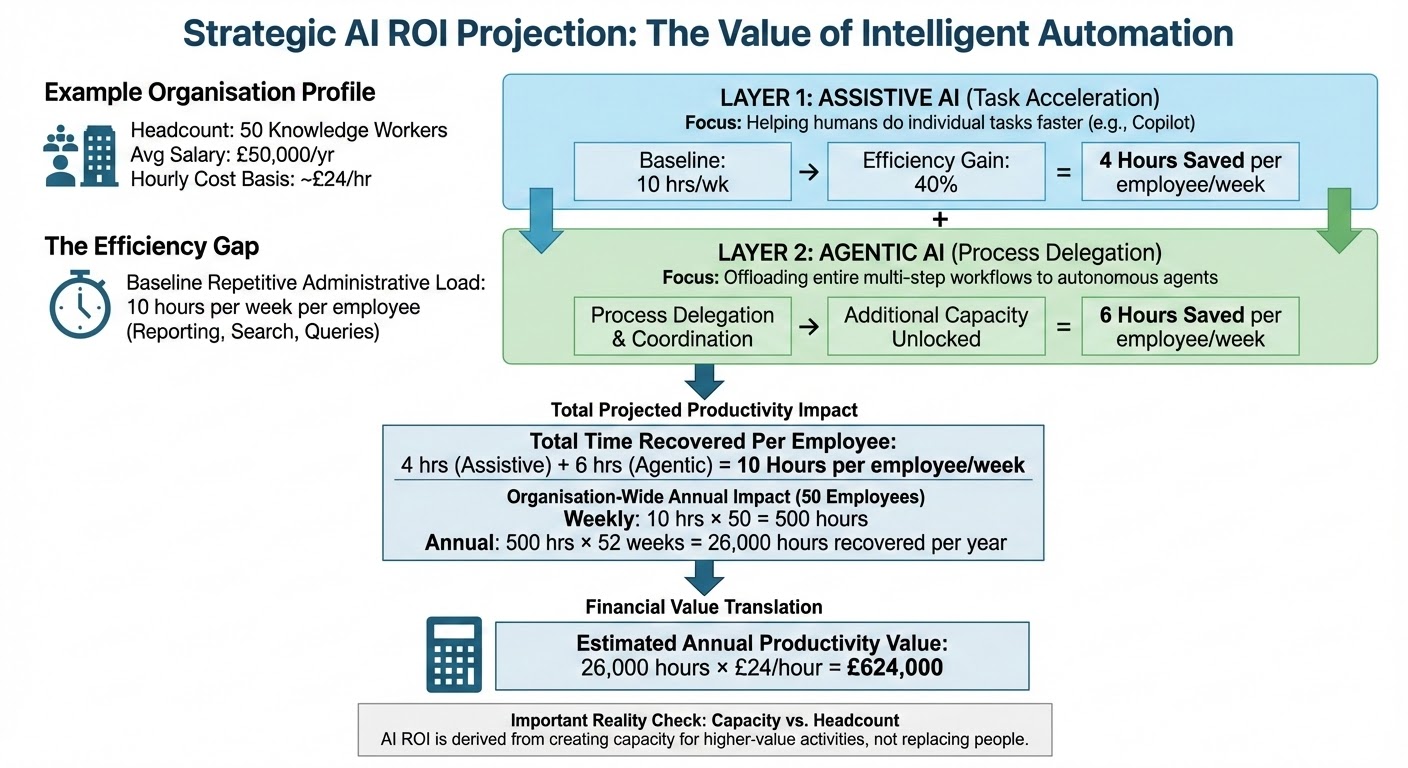
A Simple ROI Example
1
Step 1 – Number of Employees
2
Step 2 – Time Spent on Repetitive Tasks
3
Step 3 – Time Recovered With AI
Example Business Impact
Unlocked Potential
Important Reality Check
A Clear Framework for Navigating the AI Journey
A Guided Path to AI Adoption
• deploy AI solutions safely within existing systems
• introduce automation and intelligent agents in a controlled way
• scale AI capabilities as the organisation becomes more mature